Contacts 2026
- 4.2
- Rating
- 500.00K
- Installs
- Free
- Price

 Analysis by App-foxy
Contacts 2026 is a straightforward communication app from Paloleum apps that focuses on the parts of a phone I use most often: contacts, recent calls, caller identification, and dialing. After spending time with it, my overall impression is clear: it is most useful for someone who wants those everyday actions gathered into one uncomplicated place, but it is not automatically a better replacement for the phone app that already comes with every Android device.
The app is free, rated for Everyone, and supports Android 7.0 and later. Its current version is 2.4, and it has reached more than 500 thousand installs. Those figures suggest that it has found a practical audience, although the average rating of 3.7 from roughly 2.6 thousand ratings is a more mixed signal than the install count alone. I read that combination as a reason to approach it with sensible expectations rather than assuming it will transform the way every person handles calls.
What Contacts 2026 feels like in daily use
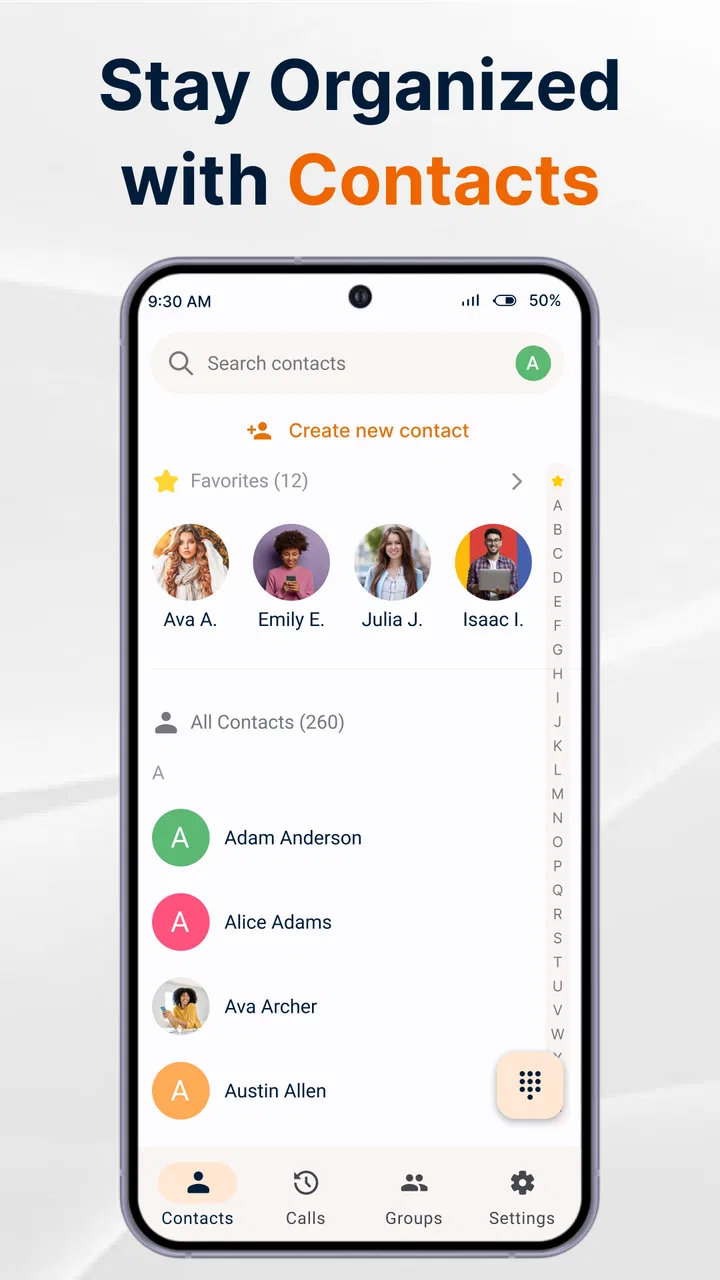
The main appeal is convenience. Instead of treating the address book, call history, caller ID, and keypad as unrelated tools, the app presents them as parts of one communication workflow. That matters when I am moving quickly between tasks. I can think about the person I need to reach, check whether I contacted them recently, and start a call without mentally switching between several phone screens.
You May Also Like

 Blood Strike: 2.5 Anniversary
Blood Strike’s Loadouts Turn Every Drop Into a Tactical Gamble
A close look at Blood Strike’s custom loadouts: how fast access to signature weapons reshapes its battle royale rhythm, rewards preparation, and narrows the gap between fights.

 Pandora - Music & Podcasts
Pandora’s Music Is Easy to Start, but Harder to Recover
Pandora’s strength is its low-effort path from a seed to a station. Its weak spot is how much confidence it asks you to place in connection, setup, and quiet recovery.

 8 Ball Pool
 Is Built on Rivalries, Rematches, and Routine
A close look at the rivalries, rematches, shared routines, and unanswered safety questions that turn a quick pool match into a persistent mobile community.

 Samsung Music
’s Quiet Strength Is Playing What You Already Own
Its reach comes less from spectacle than from dependable access to a personal library. That simplicity is both the app’s strongest retention engine and its ceiling.

 AccuWeather: Weather Radar
AccuWeather Review: A Quick, Clear Forecast for Everyday Decisions
For everyday plans, the best forecast is the one you can understand quickly. AccuWeather makes rain timing, radar, and local conditions easy to act on, with a few trade-offs.

 Hill Climb Racing
Why Hill Climb Racing Still Turns Crashes Into One More Run
A tiny car, a bumpy hill and one more upgrade: Hill Climb Racing keeps resurfacing because its simple chaos makes every near-miss feel personal.
More From Our News Desk



That sounds modest, but contact apps live or die by small moments. If I am standing outside a building trying to call someone, the best experience is not a long list of clever functions. It is finding the right name, recognizing the recent number, and dialing without hesitation. Contacts 2026 is aimed directly at that kind of use. Its store summary highlights access to contacts and recent calls, caller ID, and easy dialing, and those priorities remain visible in the way the app is positioned.
The strongest reason to try it is the single-workflow approach. People who regularly move from a saved contact to a recent call and then to the keypad may appreciate having those actions close together. It can also feel more approachable for relatives who find the default phone interface cluttered or inconsistent after a system update.
Contacts are more useful when the starting point is flexible
A common mistake with phone utilities is assuming that everyone begins with a name search. In real life, I often start with a recent call, a number I have just copied, or a familiar person whose name I only partly remember. An app centered on both contacts and recent calls is valuable because it supports those different starting points instead of forcing one route.
For example, imagine receiving a missed call while cooking. I may not want to open a full contact-management screen, search through unrelated entries, and then decide whether to return the call. A recent-calls view gives me a more direct path: identify the number, check the context, and respond. If the number is already saved, the contact information can make that decision easier. If I need to call someone who is not in the address book, the dialer remains the natural fallback.
There is also a useful distinction between a contact manager and a communication launcher. Contacts 2026 appears more focused on getting me to the call than on turning my address book into a detailed personal database. That focus can be a strength for people who want speed. It may be less satisfying for users who expect extensive contact organization, elaborate labels, or deep integration with every messaging service they use.
Caller ID can reduce uncertainty, but it should not replace judgment
Caller ID is one of the more meaningful parts of the app’s purpose. Seeing an identity before answering can help me decide whether a call is worth interrupting what I am doing. It is especially useful when I am waiting for a delivery, a repair appointment, or a return call from an unfamiliar number.
Still, caller identification should be treated as an aid rather than proof. Names can be incomplete, outdated, or simply not enough to establish that a caller is trustworthy. I would never use an identified name as a reason to share account details, verification codes, or personal information. The practical benefit is screening and context, not guaranteed security.
This is also where expectations matter. Someone choosing the app mainly to block every unwanted call or to provide a sophisticated spam-defense system may be looking for a more specialized tool. Contacts 2026 is presented as a communication app with caller ID, not as a complete answer to every nuisance-call problem. I would use the identification feature to make quicker decisions, while keeping the phone’s existing safety habits and common sense in place.
A realistic routine for families and busy users
Consider a parent who keeps separate numbers for a school, a childcare provider, a doctor, and several family members. The challenge is not merely storing those contacts. It is remembering which person called last, returning a missed call at the right moment, and avoiding accidental calls to the wrong entry when time is short.
In that situation, the combination of contacts and recent calls is more useful than a bare address book. I would first check the recent activity to understand who tried to reach me, then open the matching contact before dialing back. For a number that is not saved, I would use the keypad and decide afterward whether it deserves a permanent place in my contacts. That small workflow prevents the address book from filling with every temporary number that appears on the screen.
Another practical habit is to use the recent-call list as a short-term task queue. If I need to return several calls, I can work through the list rather than relying on memory. I would still verify names and numbers carefully, especially when two contacts have similar names or when a shared household phone is involved. The app can make the process more orderly, but it cannot make a careless contact list accurate.
Where the app fits beside the default phone tools
Android’s built-in phone and contacts apps already cover the basic needs of most users. They are familiar, usually connected closely to the operating system, and often follow the visual language of the device. If the default tools already give me a clear contact list, a reliable call history, and a comfortable dialer, switching may not produce a dramatic improvement.
Contacts 2026 makes more sense when the default experience feels fragmented or difficult to navigate. Its appeal is not that calling is suddenly different; it is that the route from contact to call is intended to feel more unified. That can be enough for a person who values a simpler front door to communication.
There is a trade-off, though. A separate app adds another interface to learn and another place where I need to confirm that the information I see is current. Users who depend heavily on the phone maker’s contacts synchronization, device-specific calling features, or a broader productivity ecosystem may prefer to stay with the built-in tools. In that case, the familiar alternative may be more dependable simply because it is already woven into the phone.
Dedicated caller-ID services can also be a better choice for someone whose main concern is identifying unknown callers. Conversely, a full contacts-management solution may suit a user who needs detailed organization rather than quick dialing. Contacts 2026 occupies the middle ground: more focused than a simple list of names, but not something I would choose solely for advanced address-book administration.
Small workflow choices that make it more practical
My first tip is to treat the contact list as a working tool rather than a storage bin. Before saving a new number, I would decide whether I am likely to call that person again. Temporary numbers can remain in recent calls, while recurring contacts deserve clear names that are easy to distinguish. This makes the app’s central search-and-call purpose more effective over time.
My second tip is to check the recent-call context before returning an unfamiliar number. A missed call may be important, but it may also be an accidental dial or an unwanted interruption. Caller ID can provide a useful clue, yet the safest decision often comes from combining the displayed identity with what I was expecting that day.
My third tip is to use the keypad deliberately when a number is not already saved. It is tempting to save every unknown caller immediately, but that can create duplicate or misleading entries. I would call first only when the situation makes sense, then save the number with a descriptive name if it becomes a genuine recurring contact. This keeps the address book useful instead of turning it into a record of every brief interaction.
A fourth consideration is shared-device use. If several people use the same phone, a unified communication screen can be convenient, but it also makes contact accuracy more important. I would review the name shown before dialing and avoid assuming that the most recent call belongs to the person I have in mind. The app can reduce navigation, but careful confirmation remains essential when contacts overlap.
Limitations I would consider before installing
The mixed rating tells me that the experience will not be equally convincing for everyone. A simple communication app can feel excellent when its layout matches a person’s habits and frustrating when it does not. If I already know exactly where everything is in the default dialer, even a cleaner alternative may feel like an unnecessary detour.
There is also a natural limit to what a phone-centered app can solve. It can bring contacts, call history, caller ID, and dialing into a more convenient flow, but it does not remove the need to maintain accurate contact information. It also does not turn unknown calls into automatically trustworthy conversations. Users expecting a complete communications hub should distinguish between the app’s practical calling focus and the much broader role of messaging, email, video calls, and spam protection.
I would also be cautious about installing it on a phone where call handling is already tightly customized by the manufacturer. The more heavily a device relies on its own dialer behavior, the more important it is to test whether a second communication interface actually improves the routine. The app is free, so trying it is relatively easy, but convenience should be judged after ordinary use rather than after a quick glance at the opening screen.
Who should give it a try
I think Contacts 2026 is best suited to people who want a direct, uncomplicated way to move among their saved contacts, recent calls, caller identification, and dialer. It could be a sensible choice for someone whose current phone interface feels scattered, for a family member who wants fewer steps, or for a user who frequently returns missed calls and wants that activity closer to the address book.
It is also a reasonable option for people using older supported Android phones. The minimum requirement of Android 7.0 makes the app accessible to devices that may not run the newest system software. That does not guarantee identical behavior on every phone, but it does make the app relevant beyond the newest hardware.
I would skip it if my priorities were advanced contact databases, deep cross-service messaging, or a specialized anti-spam system. I would also hesitate if the default phone app already handles calls exactly as I want. In those cases, a dedicated alternative or the built-in tools may offer a clearer reason to switch.
Paloleum apps has created a focused communication utility rather than an oversized all-purpose suite. That focus is its main advantage and its main boundary. The app does not need to do everything to be useful, but it needs to make everyday calling noticeably easier for the particular person using it.
My final view after using the app
Contacts 2026 earns consideration because it understands a simple truth about phone use: people do not think in separate menus for contacts, call history, caller ID, and dialing. They think, “I need to reach this person,” and want the shortest reliable path from that thought to a call. By bringing those tasks into one communication-oriented experience, the app can make routine calling feel more organized.
My recommendation is practical rather than universal. Try it if your current phone tools feel disjointed or if you regularly lose time switching between a contact list, recent calls, and the keypad. Use the recent-call workflow carefully, keep saved entries tidy, and treat caller identification as helpful context rather than a guarantee. If the built-in dialer already feels natural, the change may not be worthwhile.
With a 3.7 average and more than 2.6 thousand ratings, the app presents itself as a useful but not unquestionable choice. I would describe it as a focused convenience layer: worth trying for simpler call management, but not a replacement for every communication need. For the right Android user, that narrower promise is enough to make it valuable.
FAQs for Contacts 2026
01What features does Contacts 2026 offer for managing my contacts?
Contacts 2026 provides a comprehensive set of features for managing your contacts efficiently. It includes smart categorization, easy import and export options, duplicate contact merging, and cloud synchronization. Additionally, it offers advanced search functions, customizable labels, and the ability to add notes and reminders to individual contacts.
02Is Contacts 2026 available for both Android and iOS devices?
Yes, Contacts 2026 is available for download on both Android and iOS platforms. Users can find the app on the Google Play Store for Android devices and the Apple App Store for iOS devices. It is optimized to provide a seamless experience across different operating systems.
03How does Contacts 2026 ensure the privacy and security of my contact information?
Contacts 2026 prioritizes user privacy and employs advanced encryption protocols to protect your data. It securely stores contacts on your device and offers optional cloud backup with end-to-end encryption. The app also includes features to manage permissions and control data sharing, ensuring your information remains confidential.
04Can I customize how my contacts are displayed in Contacts 2026?
Absolutely! Contacts 2026 offers extensive customization options for displaying contacts. Users can choose from various view modes, sort contacts by different criteria (such as name or date added), and apply customizable themes. This flexibility allows you to tailor the app's appearance according to your preferences.
05Does Contacts 2026 support integration with other apps and services?
Yes, Contacts 2026 supports integration with a range of other apps and services. It can sync with email clients, social media networks, and productivity tools, allowing for a unified contact management experience. This feature ensures that your contact information is up-to-date across all platforms you use.
Pros
- User-friendly interface for easy navigation.
- Seamless integration with cloud services.
- Advanced search features for quick access.
- Customizable contact labels and fields.
- Efficient contact backup and restore options.
Cons
- Limited theme customization options.
- Occasional sync delays with some accounts.
- Requires internet for full functionality.
- Ads in the free version can be intrusive.
- Some features locked behind paywall.

Contacts 2026
Gallery